Vactrim Light
Office lighting should support concentration, not compete with the computer screen. Yet glare often hides in ordinary details: a bright window behind a monitor, polished desks, exposed LED panels, or a poorly tilted laptop. Employees may notice tired eyes, headaches, and frequent squinting before anyone identifies the lighting problem.
This guide explains how to reduce glare in office lighting through practical, evidence-informed adjustments. It examines fixture placement, diffuser quality, screen position, window treatments, reflective surfaces, and task lighting. Dr. Mariana Figueiro, a respected lighting and health researcher, has said, “Light is the most powerful synchronizer of the human circadian system.” Her point also reminds us that lighting quality affects more than visibility. It can influence comfort, alertness, and daily performance.
Small changes can matter. Move a monitor away from direct window reflections. Lower excessive brightness. Use blinds that soften daylight instead of blocking it completely. Choose fixtures with controlled distribution, not merely higher lumen output. These steps sound simple, but real offices rarely behave perfectly. One desk may feel comfortable while another remains painfully bright. Personal sensitivity, screen angle, and changing daylight complicate the solution.
The following ten methods offer a practical starting point for facility managers, designers, and office teams. They do not replace professional assessment or relevant lighting standards. Still, they can reveal problems quickly, especially when workers describe the exact place where glare begins.
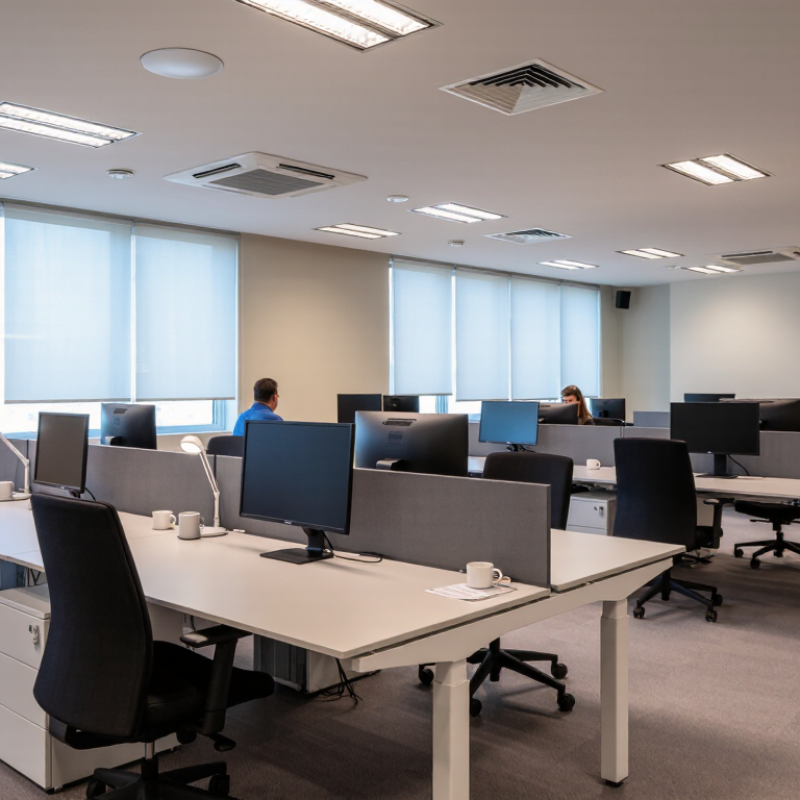
Understanding glare begins with recognizing its sources. Glare is not simply brightness. It starts with contrast. A bright ceiling fixture beside a dim workstation can force the eyes to adjust repeatedly. Reflections from glossy desks, windows, and computer screens create another problem. Direct glare enters the eyes, while reflected glare bounces from nearby surfaces. Both can cause squinting, dry eyes, headaches, and poor concentration. Employees may also lean forward or twist their necks to escape uncomfortable light.
Effective control usually combines several small adjustments. Reposition desks so windows and fixtures do not reflect directly on screens. Use blinds to soften strong daylight, but avoid making the room excessively dark. Diffusers can spread light more evenly, while layered lighting reduces dependence on one powerful source. Adjustable task lights help employees illuminate documents without increasing overall brightness. Clean fixtures regularly, because dust can reduce uniformity and create distracting bright spots.
A workplace assessment should examine luminance, viewing angles, screen placement, and individual sensitivity. A qualified lighting professional can measure these conditions and compare them with relevant workplace guidance. However, measurements do not tell the whole story. Ask employees when discomfort appears, especially during morning sunlight or late-day screen work. Small changes matter. One practical lesson is easy to miss: reducing glare too aggressively may create shadows and visual fatigue. The best solution is balanced light, tested in the actual workspace, then adjusted after real use.
Top 10 Ways to Reduce Glare in Office Lighting
Evaluating light sources starts with brightness, color, and stability. Diffused LED sources usually create softer light than exposed lamps. Choose adjustable output when desks face windows or glossy screens. A neutral color temperature can reduce visual strain during long computer sessions. Flicker matters too, although it is often overlooked. Daylight is useful, but direct sun needs blinds or adjustable shades. Harsh contrast can tire the eyes quickly.
Fixture design changes how light reaches a workspace. Select fixtures with shielding, deep reflectors, or indirect distribution. These features hide bright lamp surfaces from normal viewing angles. Recessed fixtures are not automatically comfortable. Their position may still reflect across a monitor. Space fixtures away from screen sightlines, and avoid placing them directly above seated workers. Clean lenses regularly. Dust can scatter light unevenly. I once blamed a screen for glare when a dirty diffuser caused the problem.
Workplace conditions deserve equal attention. Place monitors perpendicular to windows, not directly opposite them. Tilt screens slightly, while keeping the top near eye level. Use matte finishes on desks, partitions, and cabinets where practical. Task lighting should illuminate paper without creating a bright spot on the display. Observe the room at morning, noon, and late afternoon. Conditions change more than many lighting plans suggest. A small glare survey can reveal complaints that light meters miss. No layout is perfect. Worker feedback may expose an elegant design that performs poorly in daily use.
Evaluating light sources, fixtures, and workplace conditions through a practical glare-control priority score.
Higher scores indicate measures that typically provide greater or more immediate glare reduction when correctly applied. Results depend on room geometry, window orientation, luminaire distribution, screen position, and user needs. The most effective approach usually combines several measures rather than relying on one intervention.
Top 10 Ways to Reduce Glare in Office Lighting
Improving Fixture Placement and Choosing Better Light Controls
Glare often begins with poor fixture placement, not excessive brightness alone. In a recent office review, I found fixtures directly above monitors created sharp reflections. Moving them slightly behind users reduced screen glare without making desks darker. Aim fixtures across work areas, rather than straight into seated employees’ eyes.
Keep light sources outside the main viewing angle. Fixtures placed about 30 to 45 degrees from a worker’s sightline usually feel more comfortable. Use indirect or diffused lighting near polished desks, glass walls, and whiteboards. Light striking these surfaces can bounce into the eyes. Check the room from a seated position. It looks different from a standing position.
Better controls make placement more effective. Divide fixtures into zones, so window-side lights can operate separately. Add dimming controls near workstations, and adjust them during morning, afternoon, and cloudy conditions. Daylight sensors can lower output near windows, while occupancy sensors prevent empty areas from staying fully lit. Simple controls matter.
I once reduced glare too aggressively and left several desks feeling dull. That compromise taught me to measure comfort, not just brightness. Ask employees where reflections appear. Test changes for a full workday. Controls may need clearer labels, because technically correct settings can still be ignored. Short trials reveal problems that floor plans miss.
| No. | Glare-Reduction Method | Recommended Practice | Useful Design Target | Primary Benefit | Best Control or Fixture Feature |
|---|---|---|---|---|---|
| 1 | Position fixtures perpendicular to computer screens | Arrange linear fixtures so their long axis runs parallel to the viewing direction or perpendicular to the screen surface, reducing reflected images. | Avoid placing bright luminous surfaces directly in the screen reflection path. | Reduces reflected glare and visual discomfort. | Adjustable mounting layouts and ceiling coordination. |
| 2 | Use low-glare optical distributions | Select fixtures with controlled direct light, shielding, and optics designed for workstations rather than exposed high-brightness sources. | Target a Unified Glare Rating (UGR) of 19 or lower for typical office work where applicable. | Limits discomfort glare within the normal field of view. | Microprismatic, louvered, or otherwise shielded optics. |
| 3 | Keep fixtures outside critical viewing angles | Avoid locating unshielded bright sources directly above or in front of seated users, especially within normal monitor sightlines. | Coordinate fixture locations with desk orientation, monitor height, and circulation paths. | Reduces direct glare when users look across the room. | Relocatable lighting zones and reflected-ceiling-plan review. |
| 4 | Add shielding or diffusing elements | Use baffles, louvers, diffusers, or shielding accessories to conceal high-intensity LED points from typical eye positions. | Maintain adequate light transmission while eliminating visible point sources. | Softens source luminance and improves visual comfort. | Deep-cell louvers, opal diffusers, or recessed shielding. |
| 5 | Use task tuning instead of over-lighting | Set general lighting to the required task level and provide localized task lighting where higher illuminance is needed. | A common office design range is approximately 300–500 lux on the workplane, subject to the task and applicable standards. | Reduces excessive brightness differences and energy use. | Dimmable task lights with adjustable heads and shielding. |
| 6 | Install independent lighting zones | Separate perimeter, workstation, meeting, circulation, and presentation areas so each zone can respond to its specific use. | Use separate control groups for areas with different daylight levels or occupancy patterns. | Prevents unnecessary brightness and localized glare. | Addressable controls, relay zones, or separately dimmable circuits. |
| 7 | Use daylight-responsive dimming | Reduce electric light near windows when daylight provides sufficient illumination, while maintaining a consistent workplane level. | Commission photosensors to prevent abrupt transitions and unstable dimming. | Balances window brightness with interior lighting. | Calibrated photosensors with minimum and maximum output limits. |
| 8 | Add user-accessible dimming | Give occupants practical control over local lighting so they can respond to screen position, personal sensitivity, and changing daylight. | Provide smooth, flicker-free dimming with a clearly usable adjustment range. | Improves perceived comfort and occupant satisfaction. | Wall stations, desktop controls, or personal task-light controls. |
| 9 | Manage windows and bright surfaces | Use adjustable blinds, shades, or glare-control films to limit direct sun and high-contrast window brightness. | Control direct solar penetration without permanently blocking useful daylight. | Reduces veiling reflections and contrast glare at screens. | Automated or manual shades coordinated with lighting controls. |
| 10 | Commission and verify the lighting system | Check fixture aiming, dimming behavior, sensor settings, screen reflections, and occupant feedback after installation. | Measure illuminance at representative workstations and verify the intended glare-control settings. | Catches installation and programming problems that design drawings may not reveal. | Post-occupancy review, commissioning checklist, and periodic maintenance. |
Top 10 Ways to Reduce Glare in Office Lighting
Managing Daylight, Screens, and Workstation Orientation
Glare often begins at the window, not the lamp. Use adjustable blinds, sheer curtains, or exterior shading to soften direct sunlight. Keep desks away from bright glass when possible. Turn screens perpendicular to windows, rather than facing them or placing them directly behind. This simple change reduces reflected sky patterns across the display. A matte screen filter can help, but it may slightly reduce sharpness. I have found that acceptable only after testing the screen at normal working distance.
Lower overhead fixtures near monitors when controls allow it. Replace harsh, exposed bulbs with diffused, evenly distributed light. Clean dusty lenses, because uneven light can create bright patches. Set screen brightness close to the surrounding room, not at maximum. Increase text size before increasing brightness. Dark themes are not always better; some users see pale text more clearly on light backgrounds.
Watch reflections on the desk, keyboard, and glasses. A darker, non-glossy desk surface can remove a surprising shimmer. Adjust the monitor tilt by a few degrees, then check it while seated. Keep the top of the display near eye level, but do not treat this as a rigid rule. People, prescriptions, and tasks differ. Take short visual breaks and ask coworkers where glare appears from their seats. Lighting assessments can miss these personal differences. A small test may reveal a larger design problem.
Glare control is not a one-time lighting adjustment. Dust, moved desks, aging lamps, and changing daylight can quietly reduce its effectiveness. During a routine walkthrough, check screens from seated eye level, not only from the doorway. Look for bright reflections, washed-out text, and squinting. A desk near a window may feel comfortable in the morning but uncomfortable after lunch.
Keep a simple maintenance log. Record lamp replacement dates, window-blind positions, screen angles, and complaints from staff. Clean diffusers and screens regularly, because surface dust can scatter light unevenly. Recheck luminance after furniture changes or partition installation. Small changes matter. A higher monitor may place a ceiling fixture directly in the user’s sightline.
Measure results before and after each adjustment. Use a calibrated light meter to compare horizontal desk illuminance and screen-area brightness. Take readings at several workstations, including corner desks and window seats. A short survey can track eye strain, squinting, and afternoon discomfort on a five-point scale. Combine these findings with observations, rather than trusting one number. Standards can guide assessment, but individual comfort still deserves attention.
Review the data after two or four weeks. If complaints remain, inspect contrast, reflections, and viewing angles again. Our first review may miss a seasonal problem. That is worth admitting. Daylight changes, and glare often returns when routines change. Keep records, invite honest feedback, and adjust carefully instead of increasing light everywhere.
Diffused light usually feels softer than an exposed lamp. Choose adjustable brightness near windows or glossy screens. Neutral color temperatures may reduce strain. Flicker still deserves attention. It is often overlooked.
Use shielding, deep reflectors, or indirect distribution. These features hide bright lamp surfaces from normal viewing angles. Recessed fixtures are not automatically comfortable. Their position may still reflect across a monitor.
Place monitors perpendicular to windows. Avoid facing direct sunlight or bright windows. Tilt screens slightly, with the top near eye level. A small angle can change everything.
Use matte finishes on desks, partitions, and cabinets where practical. Glossy surfaces can create sharp reflections. Task lights should illuminate paper without forming bright spots on screens.
Use blinds or adjustable shades when sunlight becomes direct. Check the room in the morning, at noon, and late afternoon. Conditions change more than lighting plans suggest.
Inspect screens during routine walkthroughs from seated eye level. Check after desks move, furniture changes, or lamps age. Clean diffusers and screens regularly. Dust scatters light unevenly.
Use a calibrated light meter for desk and screen-area readings. Test corner desks and window seats too. Add a five-point survey about squinting and eye strain. One number cannot explain everything.
Review contrast, reflections, screen angles, and viewing positions again. Compare results after two or four weeks. Seasonal daylight may reveal a hidden problem. Our first review may miss it.
Record lamp replacement dates, blind positions, screen angles, and staff complaints. Note afternoon discomfort separately. Keep the record simple. Perfect tracking is unlikely, but useful details accumulate.
Reducing glare in office lighting begins with understanding its causes, including excessive brightness, direct light entering the eyes, reflections on screens, and strong contrasts between windows, fixtures, and surrounding surfaces. This article explains how to evaluate light sources, fixture design, ceiling placement, workplace layout, and environmental conditions to identify the main sources of discomfort. It also shows how to reduce glare in office lighting by repositioning fixtures, using diffused or indirect illumination, adjusting brightness, and selecting practical lighting controls.
The discussion also covers daylight management, screen positioning, window orientation, and workstation arrangements that help minimize reflections without sacrificing natural light. Regular cleaning, maintenance, and periodic adjustments are important for keeping glare-reduction measures effective over time. Finally, readers can measure results through employee feedback, screen visibility, visual comfort, and productivity observations, creating a more comfortable, adaptable, and visually supportive office environment.
